Inspect everything
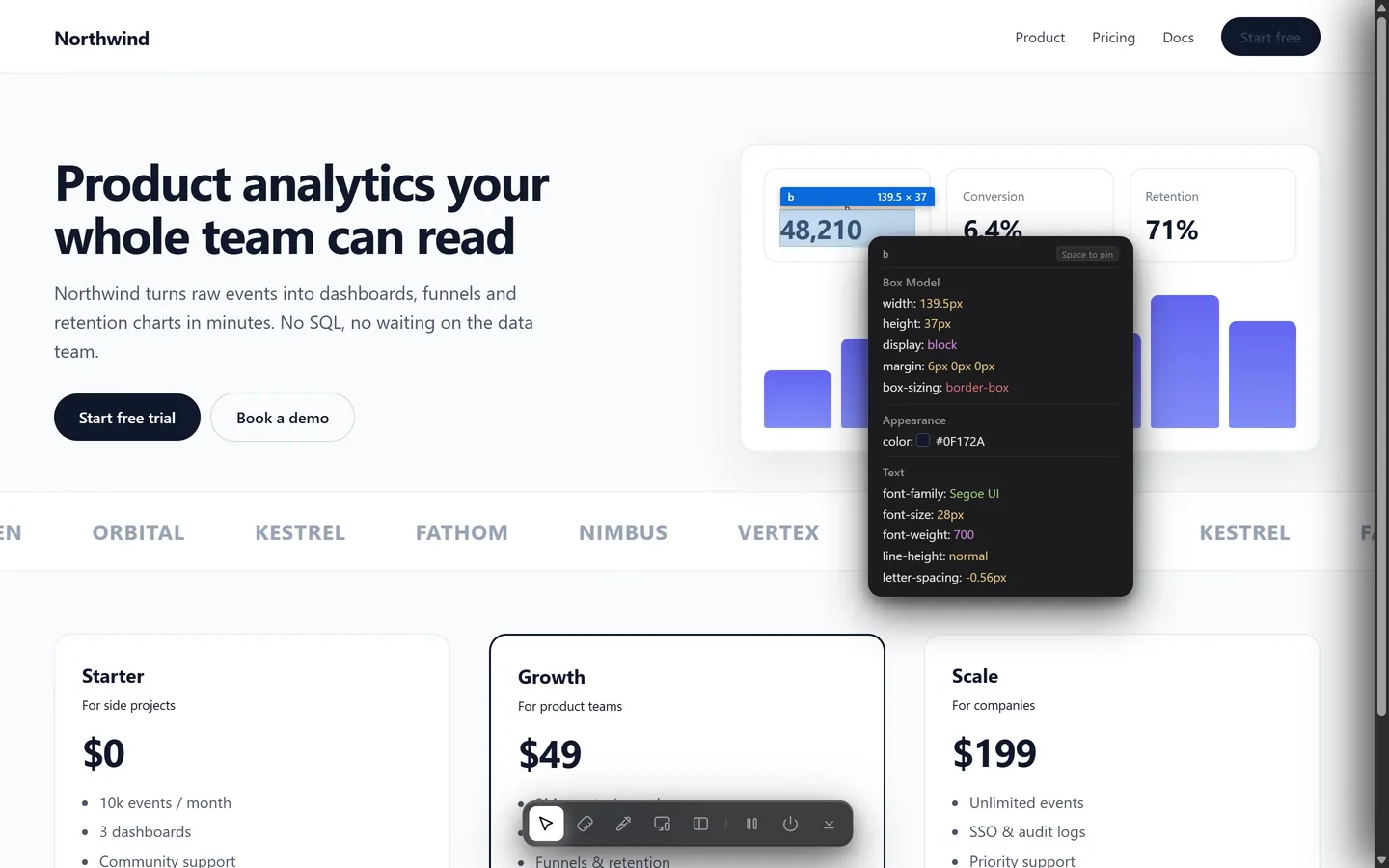
Hover any element for its size, margin, padding, typography and colors. Press Space to pin it and compare elements side by side.
 Design Toolkit
Hover any element for its CSS. Pull the colors out of any image and paste them into Figma. Copy a whole section as code, and hand it or any animation to your AI. One extension, on any website.
Composable building blocks for teams that care about every pixel, from the first sketch to production.
Move your mouse over the preview. Switch tools in the dock, or press M to measure.
Inspect, measure, audit and copy, without opening DevTools or a design file.
Hover any element for its size, margin, padding, typography and colors. Press Space to pin it and compare elements side by side.
Pick an element, hover another and read the exact gap in pixels, with page rulers and a live crosshair.
Durations, easing curves, keyframes and hover values, packed into one brief you paste into your AI.
Install it from the Chrome Web Store and get the same tools in Chrome, Edge, Brave, Opera, Vivaldi and Arc, on every site you visit.
 Chrome
 Edge
Edge Brave
Brave Opera
Opera Vivaldi
 Arc
ArcClick a photo, banner or video on any website. Design Toolkit reads its main colors and hands them over as Figma swatches or code.
Give ChatGPT, Claude, Gemini or Cursor the real code of a section, not a screenshot. It rebuilds the design exactly, with the same layout, spacing and fonts.
Found an animation you love? Design Toolkit measures it on the live page and writes a brief your AI can rebuild in your own stack, with the exact timing and easing.
Recreate this animation from a web page.Match the timing, easing, values and trigger exactly. ## Element- Tag: <a>, text: "Start free trial"- Classes: btn- Size: 152 × 49 px ## What changes- background-color: rgb(15, 23, 42) → rgb(30, 41, 59) on hover- transform: none → translateY(-2px) on hover ## Transitions- background-color: 0.25s ease- transform: 0.15s cubic-bezier(0.4, 0, 0.2, 1) ## CSS.btn { transition: background-color 0.25s ease, transform 0.15s cubic-bezier(0.4, 0, 0.2, 1);}.btn:hover { background: rgb(30, 41, 59); transform: translateY(-2px); }
Inspect, measure, audit and test, without opening DevTools or a design file.
Hover any element for size, spacing, type and colors in a floating card, with the box model drawn on the page. Press Space to pin it.
Pick one element, hover another and read the exact gap in pixels. Page rulers and a crosshair come with it.
Computed CSS, the page's real rules (with @media and @layer), Tailwind classes or a React style object.
Phone, tablet and desktop side by side. Search 20+ devices or type your own size, then rotate, zoom and sync scrolling.
Pick any pixel with the eyedropper. HEX, RGB or HSL, with the WCAG contrast ratio and an AA or AAA badge.
Every color a page uses, ready to export to Figma, CSS variables, Tailwind or JSON tokens.
Font family, size, weight, line height and letter spacing, with a live preview of the typeface.
Save images, SVGs, video posters and videos with their real file names.
Meta tags, social previews for Facebook, X and LinkedIn, page weight by type and detected technologies.
Add Design Toolkit to Chrome, Edge, Brave, Opera, Vivaldi or Arc. No account, nothing to configure.
Click the toolbar icon or use the shortcut on any website.
Every tool is one key away.
Choose how to start, whether you design in Figma or build with AI.
Perfect for trying every tool on a real project. No card needed.
Perfect for designers and vibe coders who use it every week.
$5 launch price while it lasts. 14-day refund on every purchase.
Every tool is free for 7 days. After that, lifetime access is a single payment, with no subscription. The launch price is $5 instead of $10 right now, for everyone, whether the extension is installed or not.
Checkout is handled by Polar, our merchant of record, and takes major debit and credit cards such as Visa and Mastercard. If your card is declined, check that it is enabled for international online payments, which many banks turn off by default, or try another card. Your license key arrives by email right after payment, and every purchase has a 14-day refund.
Google Chrome, Microsoft Edge, Brave, Opera, Vivaldi and Arc, all from the Chrome Web Store. A Firefox version isn't available yet.
No. The extension runs in your browser, with no account and no analytics, and the pages you inspect never leave your device. If you buy a license, only your license key is sent to Polar to confirm it. The images you pull colors from are read in your browser too. Files are only downloaded and text is only copied when you ask for it.
Press Shift + C, or open the arrow next to the color picker in the dock and choose Colors from image. Click any image on the page and its colors appear. Press Copy for Figma, click your Figma canvas and paste with Ctrl + V (⌘ + V on Mac). Each color becomes an editable rectangle named after the color. Prefer code? Copy the same colors as CSS variables, Tailwind v4 or v3, or JSON tokens.
Yes. Select a section, open the side panel with O and use the Export card: choose Tailwind, HTML, React, Vue or Elementor, then Copy or Download. Paste it into ChatGPT, Claude, Gemini or Cursor and ask it to rebuild the section. Preview shows the result at phone, tablet and desktop widths first. Pages that rearrange themselves with JavaScript can come out slightly different, so check the preview.
Select an element that moves, open the Animations section in the side panel and press Copy for AI. You get a ready-to-paste brief with the timing, easing, keyframes, hover values and full CSS, which ChatGPT, Claude or Gemini can turn into code for your project.
No. Nothing is added to a page until you turn the toolkit on. Press P to pause and use the page normally, or Esc to quit.
Alt + R (⌥ + R on Mac) toggles the toolkit, Alt + I inspects, M measures, O opens the side panel, R opens responsive mode, C picks a color, Shift + C takes the colors of an image, Space pins an element, ↑ ↓ select the parent or child, P pauses, H hides the dock and Esc quits.
Hover for the real CSS, pull its colors into Figma, or give your AI the code of a whole section. Free for 7 days.
No accountRuns locally14-day refund